When we talk about Google Business Profile optimisation, we're really talking about fine-tuning your free GBP listing to make sure it pops up more often in local searches. It’s a mix of art and science: filling out every single section with accurate, keyword-savvy info while actively using features like Posts and Reviews to pull in customers and climb the rankings on Google Search and Maps.
Why Your Business Profile Is Your Best Local Marketing Tool
Think of your Google Business Profile as the digital front door to your business. For most potential customers in Australia, it’s the very first impression they'll have of your brand. It’s no longer just a simple listing; it’s a dynamic, interactive snapshot that can either draw customers in or send them packing to your competitors. A well-managed profile is simply non-negotiable in any modern marketing strategy.
The real power of GBP comes from how deeply it's woven into the way Aussies search for things online. Nearly half of all Google searches in Australia now have local intent—meaning people are looking for products and services right near them. This is where the magic happens. These searches are highly transactional, with 88% of people who perform a local search on their phone either visiting or contacting a business within 24 hours. A fully optimised profile is your ticket to being seen in those critical moments. You can explore our guide on local SEO for small business to see how this fits into a bigger picture.
The Real Impact on Your Business
Ignoring your GBP is like having an unlisted phone number. You become invisible to a huge chunk of your potential market. The data doesn't lie: an optimised profile can pull in significantly more traffic than a small business website on its own.
Here's what a well-maintained Google Business Profile dashboard looks like—it's your command centre for managing this digital storefront.
This interface is where you control everything from updating your hours to responding to customer reviews, making it an incredibly powerful—and free—tool.
The numbers are pretty compelling. Statistics show that over half of all GBP listings get more than 1,000 views each month, and around 60% of these viewers click through to the business’s website. This transforms your profile from a passive directory entry into an active lead-generation machine. You can discover more insights about Google Business Profile performance in Australia on distl.com.au.
Reddit-Worthy Insight for Journalists: "Your Google Business Profile isn't just another social media account to manage; it's the most valuable piece of digital real estate you own for local marketing. While your website might get a few hundred organic visitors, a properly optimized GBP can put you in front of thousands of high-intent local customers actively looking to buy right now. It's the difference between waiting for customers to find you and meeting them exactly where they're looking."
Building Your Foundation: A Complete GBP Setup Checklist
Getting your Google Business Profile set up correctly is the single most important thing you'll do in your local SEO journey. Think of it like pouring the concrete slab for a house; if that foundation is shaky or incomplete, everything you build on top of it will be unstable. A meticulously filled-out profile is the absolute bedrock of good GBP optimisation. It’s your first and best signal to Google that you're a legitimate, active, and relevant business worth showing to local customers.
This isn't just about plugging in your business name and phone number. It’s a strategic process. Every single field needs to be completed with care, ensuring each piece of information works together to build a powerful, authoritative online presence. It’s surprising how many businesses just skip over this part.
A staggering 55% of Australian local businesses haven't even claimed their Google Business Profile listing. This is a massive missed opportunity, especially when you consider that 94.5% of Australians use Google to find local services. With the average Aussie business getting 67 actions a month from their GBP—like website clicks and calls—leaving it unclaimed is like leaving money on the table.
This infographic breaks down the simple but powerful journey a customer takes from a local search to actually engaging with your business.
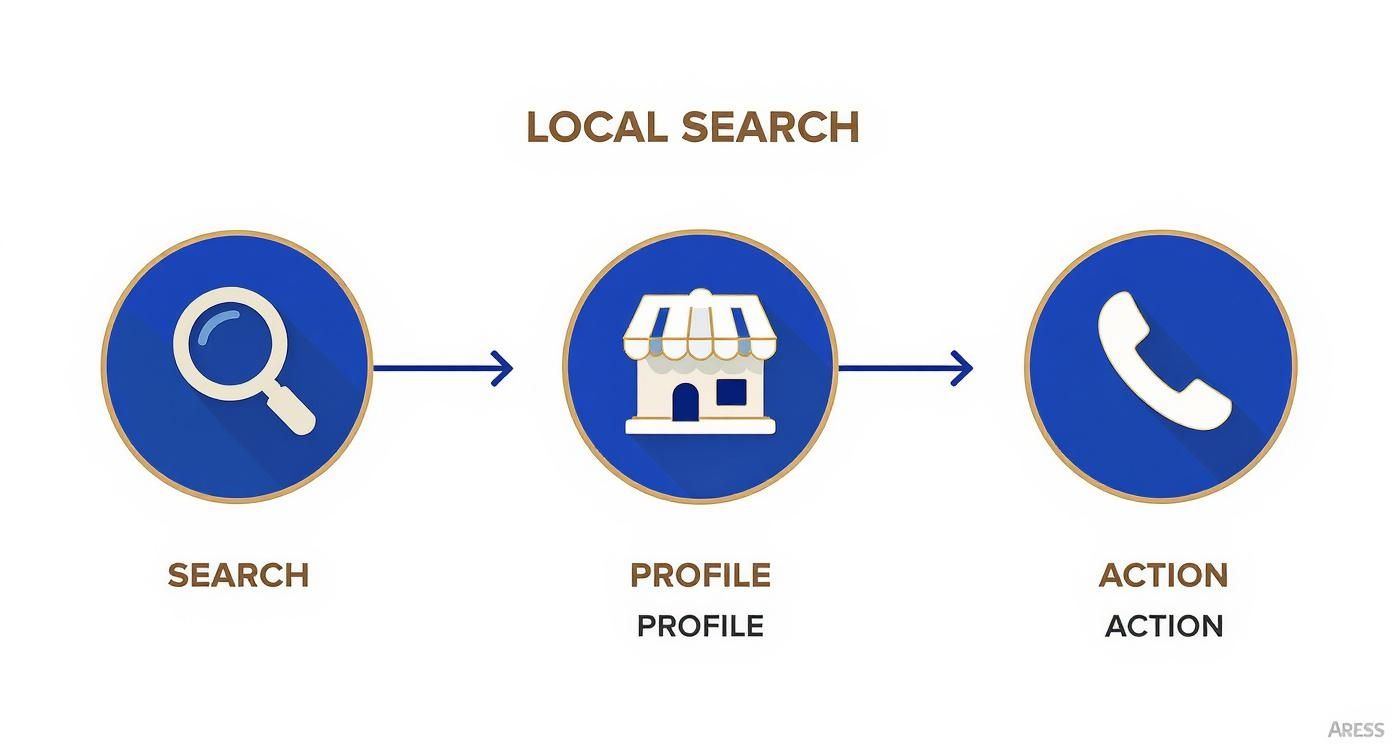
As you can see, your optimised profile acts as the essential bridge, turning a simple search into a direct customer action. It’s a critical conversion point you can't afford to ignore.
To get this foundational piece right, it’s helpful to use a checklist approach. This ensures you’ve covered all the essential details that Google uses to understand and rank your business.
GBP Core Information Checklist
Below is a breakdown of the absolute must-haves for your profile. Getting these details right from the start prevents headaches down the road and sets you up for local search success.
| Profile Element | Optimisation Tip | Why It Matters for SEO |
|---|---|---|
| Business Name | Use your exact, real-world business name. No extra keywords or locations (e.g., "JB Plumbing," not "Best Plumber Brisbane"). | Google penalises keyword stuffing in business names. Consistency builds trust and avoids profile suspension. |
| Address | Enter your precise physical address. If you're a service-area business (SAB), you can hide it and set service areas instead. | This is the 'A' in NAP (Name, Address, Phone). It’s crucial for map accuracy and verifying your physical location. |
| Phone Number | Use your primary, local business number. Make sure it matches the number on your website and other online directories. | This is the 'P' in NAP. Consistency across the web is a massive local ranking signal for Google. |
| Website | Link directly to your website's homepage or the most relevant location page if you have multiple branches. | Drives traffic and conversions. Google also crawls this site to verify information and understand your business better. |
| Business Hours | Be meticulous. Set your standard hours and always update them for public holidays or special events. | Accuracy is key for user experience. Incorrect hours lead to frustrated customers and negative reviews, which hurts rankings. |
| Primary Category | Choose the most specific category that describes your main service (e.g., "Family Law Attorney," not just "Lawyer"). | This is one of the most powerful ranking factors. It tells Google exactly what you do and unlocks category-specific features. |
Completing these core fields is non-negotiable. They form your Name, Address, and Phone number (NAP), and absolute consistency with this data across the entire internet is a cornerstone of local SEO.
Choosing Your Business Categories Strategically
Selecting the right categories is one of the most impactful tweaks you can make. This is how you tell Google, in its own language, what your business is and which searches you should show up for.
Your primary category needs to be your main game. If you're a law firm that mostly handles divorces, your primary category should be "Family Law Attorney," not the broader "Legal Services." Getting this right can unlock special features in your profile, like booking buttons for a salon or menu links for a restaurant.
Once your primary category is locked in, add secondary categories to cover everything else you do. A marketing agency might have "Web Designer" and "SEO Service" as secondary options. This casts a wider net, helping you appear in "discovery" searches—where people are looking for a service, not your specific brand.
Crafting a Compelling Business Description
You get 750 characters for your business description. This is your chance to pitch potential customers on who you are and why you're the best choice. While it's not a heavy-hitting direct ranking factor, it plays a huge role in turning a profile view into a paying customer.
- Lead with the good stuff: The first 250 characters are the most important, as the rest often gets hidden behind a "read more" link. Get your unique value proposition in there early.
- Use keywords, but be natural: Weave in your key services and location conversationally. Something like, "We are a Brisbane-based SEO consultancy…" works perfectly.
- Show what makes you different: Are you proudly Aussie-owned? Offer a unique guarantee? Specialise in a specific niche? This is the place to shout about it.
Think of this description as a mini "on-page SEO" exercise for your profile. To get the most out of it, make sure its messaging and keywords align with the core pages on your website. For more ideas, you can check out our comprehensive on-page SEO checklist.
Defining Your Hours and Service Areas
Accuracy is everything when it comes to your opening hours. List them precisely, and be diligent about updating them for public holidays or any special events. Nothing frustrates a potential customer faster than showing up to a closed business when your profile said you were open. That's a surefire way to earn a negative review.
If you're a business that travels to your customers, defining your service areas is a game-changer. Instead of just having a single pin on the map, you can tell Google the specific suburbs, postcodes, or regions you cover. This is how you show up in "near me" searches for customers within your operational footprint, even if your office is kilometres away. It’s how a plumber based in Chermside can pop up for a customer searching in Aspley.
Advanced Tactics to Engage and Convert Customers
Right, you’ve got the foundational details locked in. Now it’s time to shift your thinking from a static listing to a dynamic, engaging storefront. A lot of your competitors stop after filling out their name and address, but this is where the real work of google my business optimization begins. We're about to dive into the features that turn passive viewers into active customers.

This means using Google Posts to communicate in real-time, using photos to tell a visual story, and proactively managing the Questions & Answers section to build trust. These aren't just cosmetic touches; they are powerful signals to both Google and your customers that your business is active, credible, and ready to do business.
Get Active with Google Posts
Think of Google Posts as free, bite-sized ads that appear directly on your profile in search results. They’re perfect for sharing timely updates, promotions, and news. A staggering 84% of profile views come from "discovery" searches, where someone is looking for a category, not your specific business. Posts are your chance to grab their attention in that critical moment.
Posting regularly shows Google that you're actively managing your profile, which is a big tick in their books for rankings. More importantly, it keeps your audience in the loop and gives them compelling reasons to choose you over the other guys.
Here are a few ways to use them effectively:
- Announce a Special Offer: Promote a limited-time discount or a seasonal special. This creates a sense of urgency.
- Share a Recent Blog Post: Drive traffic back to your website and show off your expertise.
- Highlight a New Product or Service: Got something new to show off? This is the place to do it.
- Promote an Upcoming Event: Hosting a webinar or an in-store event? Get the word out here.
Key Takeaway: Treat Google Posts like a social media feed for your business profile. Aim to post at least once a week to keep your profile looking fresh and to send consistent activity signals to Google. Always include a clear call-to-action (CTA) like "Learn More," "Book Now," or "Call Today."
Tell Your Story with Photos and Videos
In the world of local search, visuals are everything. According to Google, businesses with photos in their profile receive 42% more requests for driving directions and 35% more clicks through to their websites. It’s simple: a profile rich with high-quality imagery doesn't just look better; it performs better.
Your photos should paint a picture of what it’s like to do business with you. Don't just stop at a snapshot of your front door.
Essential Visuals for Your Profile
- Logo and Cover Photo: Your logo helps customers instantly recognise your brand, while your cover photo should capture the personality of your business.
- Exterior and Interior Shots: Show people what your place looks like from the outside and what they can expect when they walk in.
- Team Photos: Putting a face to the name builds trust and makes your business feel more human and approachable.
- Photos of Your Work: Whether it’s a finished landscaping project or a beautifully plated meal, show off the quality of what you do.
Remember, anyone can upload a photo to your profile. By proactively adding your own high-quality, professional images, you maintain control over your brand's visual story. Aim to add a new photo every week. To really maximise the impact of your GBP and turn visitors into customers, explore these conversion optimization tips which you can apply to your broader digital strategy.
Proactively Manage the Q&A Section
The Questions & Answers section is one of the most underutilised—and most powerful—features of a Google Business Profile. It allows anyone to ask a question about your business, and, critically, anyone can answer it. This can be a recipe for disaster if left unchecked, leading to wrong information floating around on your profile.
Instead of waiting for questions to trickle in, take control of this section yourself. This is a practice Google not only allows but encourages.
Turning Q&A into a Powerful FAQ
Think about the top ten questions your customers always ask. Now, go to your own profile, ask those questions yourself, and then immediately answer them from your business account.
For example, a local cafe might seed questions like:
- "Do you offer gluten-free options?"
- "Is there wheelchair access?"
- "Can I make a reservation for a large group?"
By doing this, you build a pre-emptive FAQ that tackles common concerns, removes friction from the customer journey, and shows that you're attentive and customer-focused. You need to monitor this section closely and set up alerts so you can be the first to answer any new questions that pop up. This proactive approach is a cornerstone of advanced google my business optimization.
How To Manage Customer reviews and Build Trust
In the world of local search, trust isn't just a nice-to-have; it's the currency that drives business. Your Google reviews are the most direct, powerful form of social proof you've got. Think of them less as simple feedback and more as potent conversion tools that scream credibility to both Google's algorithm and your future customers.
This means a solid review management strategy is non-negotiable for any serious google my business optimisation plan. It’s not about sitting back and hoping for the best. It’s about building a system to generate a steady stream of authentic reviews and mastering the art of responding to all of them—from the glowing 5-star raves to the gut-wrenching 1-star critiques.
Fostering a Culture of Positive Feedback
First things first: you have to make it dead simple for happy customers to leave you a review. Don't ever assume they'll just go out of their way to do it. You need to ask, and you need to make it easy.
- Get Your Direct Review Link: Dive into your Google Business Profile dashboard and grab the short URL that sends customers straight to the review window. No searching, no confusion.
- Nail the Timing: The perfect moment to ask is right after a positive experience. The second they've got their product, the moment a service is complete, or right after they’ve sung your praises in person.
- Use Every Channel: Pop that link in an email follow-up, send it via SMS, or even put a QR code on your invoices and business cards.
Just remember, while you can't offer incentives for reviews (that’s a big no-no from Google), you absolutely should make the process as frictionless as possible. Your goal is to capture that happy customer glow the moment it happens.
The Art of Responding to Every Review
Responding to reviews is a massive signal to Google that you're an active, engaged business owner. But more importantly, it shows the public—every single person reading those reviews—that you actually care.
This isn’t just a hunch; the data backs it up. Australian consumers lean heavily on social proof. A staggering 33% of Aussie consumers always check online reviews, and another 43% do it regularly before choosing a local business. When you actively manage your reviews, you're meeting this behaviour head-on, building the confidence a searcher needs to become a customer. You can discover more Australian Google Business Profile statistics on bloomtools.com.
Reddit-Worthy Insight for Journalists: "Responding to a negative review isn't about winning an argument; it's a public performance for every future customer reading it. A calm, professional, and solution-focused reply can be more powerful than ten five-star reviews. You're not just talking to one unhappy person; you're showing everyone else how you handle problems."
This is your stage. A thoughtful reply can transform a bad experience into a masterclass in customer service.
Handling Negative Feedback Like a Pro
Let's be real, a negative review stings. It can feel like a personal attack. But your reaction is what defines the situation. Getting defensive or panicking is the fastest way to make a bad situation worse. Instead, have a process ready.
Here’s a simple, professional framework for your response:
- Acknowledge and Thank: Kick things off by thanking them for their feedback, even if it feels tough. "Thank you for taking the time to share your experience."
- Apologise and Empathise: Show you get their frustration. "We're very sorry to hear that your experience did not meet your expectations."
- Take it Offline: This is key. Offer a direct way to solve the problem privately. "We'd like to learn more and make things right. Please contact our manager, Jane, at [email] or [phone number]."
- Keep it Brief and Professional: No long, emotional essays. Stick to the facts and keep the focus firmly on the solution.
This approach de-escalates the tension and demonstrates to other potential customers that you take accountability seriously. While it might be tempting to try and get a bad review removed, the process is notoriously difficult. For a full breakdown, check out our guide on whether you can remove Google reviews. In almost every case, professional management is the superior strategy.
Using Products, Services and Bookings To Drive Sales
It’s time to move your Google Business Profile beyond a simple digital business card. Let's turn it into a high-powered sales and lead generation engine. So many businesses stop after filling out the basics, but the Products, Services, and Booking features are where you directly connect your offerings to customers who are ready to act. Honestly, this is a critical step in effective Google My Business optimisation.
By showcasing what you sell directly within search results, you dramatically shorten the path from discovery to conversion. You’re not just telling people what you do; you're showing them, complete with images, descriptions, and a direct way to take the next step. This transforms your profile from passive information into an active, transactional storefront.
Building Your Digital Product Catalogue
For any retail or e-commerce business, the Products feature is an absolute game-changer. It lets you build a visually appealing catalogue of your items that appears directly in your profile. Think of it less as a list and more as a rich, interactive showcase that can catch a user's eye and drive immediate interest.
Each product listing can include:
- A high-quality image of the item.
- A clear and descriptive product name.
- The price or a price range.
- A detailed description (up to 1,000 characters).
- A direct link to the product page on your website for purchase.
Imagine a local boutique in Brisbane. Instead of just stating they sell "women's clothing," they can feature their new "Summer Linen Collection," complete with photos, prices, and links to buy. This gives potential customers a tangible reason to click, moving them from a general search to a specific purchasing decision much faster.
Defining Your Service Menu
If you run a service-based business—think consultants, tradies, or professional firms—the Services feature serves a similar purpose. It’s your digital menu, allowing you to break down your broad offerings into specific, understandable items. This is far more effective than a single sentence in your business description.
A marketing agency, for example, wouldn't just list "Marketing Services." They would create separate entries for things like:
- SEO Audits: A detailed analysis of your website's search performance.
- Local SEO Packages: Specialised services for Brisbane businesses.
- Content Strategy: Planning and creation of blog posts and articles.
Each service entry can have its own description, clarifying exactly what the customer gets. This simple act of itemising your services helps Google understand your business more deeply, potentially ranking you for more specific, long-tail search queries. It also educates potential clients, answering their questions before they even have to ask.
Journalist Tip: The real magic of the Products and Services sections is how they pre-qualify leads. A potential customer who has already browsed your service menu and understands your pricing is far more likely to be a high-quality, ready-to-buy lead when they finally make contact.
Driving Conversions with Booking Links
The final piece of this sales-focused puzzle is the booking feature. This is your ultimate call to action, allowing customers to schedule an appointment, request a quote, or make a reservation directly from your profile. It removes friction and captures user intent at its absolute peak.
Google integrates with a wide range of third-party scheduling software. By linking your booking platform, a prominent "Book" or "Reserve" button appears on your profile, making the next step effortless. For a hairdresser, this could be a direct link to their booking system. For a B2B consultant, it could be a link to their "Schedule a Discovery Call" calendar.
This functionality turns your profile into a 24/7 appointment setter. Statistics consistently show that the fewer clicks required to complete an action, the higher the conversion rate. By enabling direct bookings, you cater to modern consumer behaviour and provide the instant gratification that searchers expect, ensuring you never miss a lead.
Tracking Performance To Maintain Your Momentum
Getting your Google Business Profile optimised is a massive step forward, but it's not a one-off project. The real magic happens with ongoing attention. Once your profile is polished, the next job is to measure what’s working, dig into the data, and make smart adjustments to keep the momentum going.
This is what separates you from the competition who take a "set it and forget it" approach. They might get an initial boost, but they won't sustain it.
Your best friend here is the Google Business Profile Performance dashboard. This is where Google lifts the curtain and shows you exactly how customers find and interact with your business, giving you the insights needed to stay ahead.
Understanding Key Performance Metrics
Diving into performance data can feel a bit overwhelming at first, but it really boils down to a few core areas. It's easy to get lost in vanity metrics, so my advice is to focus on the numbers that directly translate to actual business activity.
These are the critical metrics I always track for clients:
- Searches: This shows the exact search queries people used to find you. Looking at these terms is like getting a direct look into your customer's mind. It helps you fine-tune your business description and come up with relevant ideas for future Google Posts.
- How users discovered you: This breaks down whether people found you via a "Direct" search (they typed in your business name) or a "Discovery" search (they were looking for a category, product, or service you offer). A high number of discovery searches is a fantastic sign—it means your optimisation is attracting brand-new customers.
- User actions: This is the big one. It tracks high-value conversions like website clicks, phone calls, and requests for directions. These are the actions that lead directly to leads and sales.
According to research from BrightLocal, the typical Business Profile averages only 59 actions from over 1,200 views per month. By tracking and improving these specific actions, you can blow past the average and turn your profile into a consistent lead-generation machine.
Your Monthly Maintenance Checklist
To keep your profile in top shape and signalling positive activity to Google, you need a simple monthly routine. This ensures your listing stays accurate, fresh, and appealing to both the algorithm and your potential customers.
Here’s a simple 30-day check-in I recommend:
- Review your information: Just take two minutes to double-check your hours, address, and phone number. Accuracy is everything.
- Upload new photos: Add a few fresh images of your work, your team, or your location. It’s a powerful signal to Google that your business is active.
- Publish at least two Google Posts: Share updates, special offers, or company news to keep your profile dynamic and engaging.
- Respond to all new reviews: Jump on both positive and negative feedback quickly. Engagement matters.
- Analyse your performance: Check which actions are growing and what search terms are bringing in the most traffic. Let the data guide your next move.
Beyond tracking your Google Business Profile metrics, it’s vital to understand how these efforts fit into the bigger picture. You need to know how to measure your overall marketing ROI to see how your local search work contributes to your broader business goals.
Consistent tracking and maintenance are what transform a good profile into a truly great one.
Frequently Asked Questions
When you're digging into Google Business Profile optimisation, a few questions always pop up. We get it. Here are the straight-up answers to the queries we hear most often from business owners just like you.
How Long Does It Take To See Results?
This is the big one, and the honest answer is: it depends. While simple updates like changing your business hours show up almost instantly, seeing real movement in your local search rankings takes a bit of patience.
You can typically expect to see noticeable improvements in a few weeks to a few months. The key is consistent, meaningful activity. Regularly uploading new photos, publishing Google Posts, and gathering fresh reviews are all powerful signals to Google’s algorithm. Local SEO is a marathon, not a sprint—persistent effort is what gets you to the top and keeps you there.
What Is the Biggest Mistake Businesses Make?
Without a doubt, the most damaging mistake we see is the "set it and forget it" approach. So many businesses go through the initial effort of claiming their profile, filling out the basics, and then never touching it again. This is a massive misstep in any google my business optimization strategy.
Journalist Case Study: A local cafe in Sydney, "The Daily Grind," claimed their profile in 2021 but left it dormant. They ranked on page two for "cafe near me." A new competitor, "Brew & Bloom," opened nearby and implemented a rigorous GBP strategy: weekly posts, professional photos of their latte art, and responding to every review within hours. Within three months, Brew & Bloom not only outranked The Daily Grind but secured a spot in the coveted "Local Pack," while The Daily Grind’s visibility continued to decline. This illustrates that GBP isn't a static listing; it's a competitive arena where inactivity leads to invisibility.
An abandoned profile is more than just a missed opportunity; it's an open invitation for your more active competitors to swoop in and take your spot.
Do I Need a Physical Storefront?
Absolutely not. You don't need a physical shopfront to have a powerful and effective Google Business Profile. Google has specific settings for service-area businesses (SABs)—think plumbers, mobile detailers, consultants, and other professionals who travel to their customers.
When setting up your profile, you can define your service areas by listing suburbs or postcodes instead of a physical street address. This keeps your home or office address private while ensuring your business still appears in local search results and on the map for customers within your chosen territory. It's a critical tool for local lead generation for any business on the move.
Ready to turn your Google Business Profile into a powerful lead-generation tool? The Brand Express offers expert, data-driven SEO strategies to boost your local visibility and attract high-value customers. Learn more at https://www.thebrandexpress.com.au.